

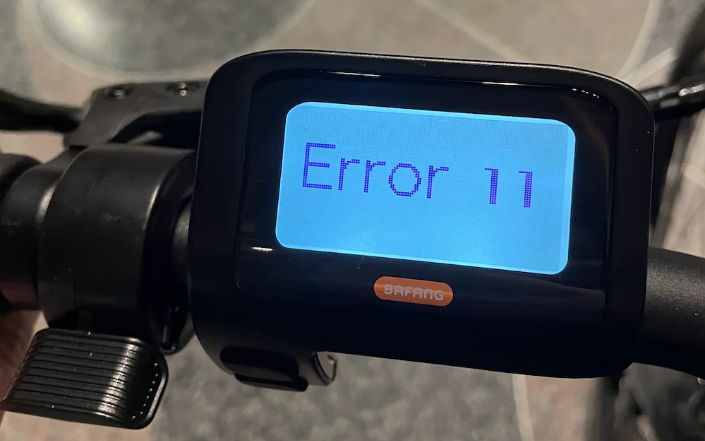
Riding your electric bike should be fun and hassle-free, but sometimes, unexpected error codes like 11 and 23 can interrupt your ride. These errors are among the most common issues e-bike riders face, and they often leave riders confused and frustrated. In this guide, we’ll break down what these error codes mean, why they appear, and exactly how you can fix them step by step.
Understanding Error Codes 11 & 23
Before diving into the fixes, it’s important to understand what these error codes indicate.
-
Error Code 11: Typically linked to the motor or controller, error 11 often occurs when your e-bike suddenly stops, fails to accelerate, or displays unusual motor behavior. It can be caused by loose wiring, sensor issues, or low battery voltage.
-
Error Code 23: Usually associated with the torque or cadence sensor, this error may appear when your pedal-assist doesn’t respond correctly. Riders might notice inconsistent power delivery or delayed acceleration.
Knowing the cause behind these codes is the first step to fixing them effectively.
Common Causes of Error Code 11
Error 11 can be triggered by several factors. Identifying the exact cause helps prevent repeated issues:
-
Battery Voltage Issues
-
If your battery is low or inconsistent, the motor may stop or display error 11.
-
Always ensure the battery is fully charged before long rides.
-
-
Loose Connections or Damaged Wiring
-
Check all connectors from the battery to the motor and controller.
-
Vibrations from riding can loosen wires, especially if connectors aren’t fully clicked in.
-
-
Faulty Motor or Controller
-
Internal faults in the motor or controller can trigger error 11.
-
If basic checks don’t work, professional inspection may be needed.
-
How to Fix Error Code 11
Follow these steps carefully to resolve error 11:
Step 1: Check the Battery
-
Make sure the battery is fully charged.
-
Inspect the battery terminals for corrosion or dirt. Clean if necessary.
-
If the battery is old or fails to hold charge, consider replacing it.
Step 2: Inspect Wiring and Connections
-
Unplug and replug all connectors, ensuring they are fully seated.
-
Look for frayed wires or damaged insulation.
-
Tighten any loose screws or bolts holding the wiring in place.
Step 3: Restart or Reset the Motor
-
Turn off your e-bike completely.
-
Wait 10–20 seconds, then power it back on.
-
Check if the error persists.
Step 4: Test Ride
-
Take a short ride to see if the motor responds normally.
-
If error 11 returns, it’s likely a controller or motor issue, and professional repair may be required.
Common Causes of Error Code 23
Error 23 is generally linked to sensor issues:
-
Faulty Torque or Cadence Sensor
-
These sensors detect pedaling effort.
-
If they fail, your pedal-assist may cut in late or inconsistently.
-
-
Dirty or Loose Connectors
-
Dirt, moisture, or vibration can disrupt sensor signals.
-
Check connectors near the pedal area and motor.
-
-
Software or Firmware Glitches
-
Occasionally, a controller firmware bug may trigger error 23.
-
Updating your e-bike’s firmware can resolve this.
-
How to Fix Error Code 23
Here’s a step-by-step method to solve error 23:
Step 1: Inspect the Sensor
-
Remove any debris or dust around the torque or cadence sensor.
-
Check for visible damage on the sensor or pedal area.
Step 2: Reconnect the Sensor
-
Unplug the sensor and plug it back in carefully.
-
Ensure connectors click into place and wires are not pinched.
Step 3: Check Sensor Alignment
-
Torque sensors may require specific alignment.
-
Consult your e-bike manual to ensure the sensor is correctly positioned.
Step 4: Restart or Reset the System
-
Power off the e-bike, wait a few seconds, then power on again.
-
Some e-bikes have a reset function in the display menu; use it if available.
Step 5: Test Pedal-Assist
-
Slowly pedal to see if the assistance is smooth and consistent.
-
If the error remains, sensor replacement or professional service may be necessary.
Preventing Errors 11 & 23 in the Future
Once your e-bike is back to normal, take these preventive steps:
-
Regular Maintenance
-
Check wiring, connectors, and sensors at least once a month.
-
Keep your bike clean and free from dust and moisture.
-
-
Avoid Extreme Loads
-
Don’t overload your e-bike with extra weight or aggressive riding that can strain the motor or sensors.
-
-
Use the Correct Charger
-
Always use the charger provided by the manufacturer to prevent voltage issues.
-
-
Update Firmware
-
Check for updates to your e-bike’s controller software regularly.
-
-
Store Properly
-
Avoid leaving your bike in extremely hot, cold, or humid conditions.
-
When to Seek Professional Help
Some issues cannot be solved at home. Contact a certified repair center if you notice:
-
Persistent error codes after troubleshooting
-
Strange motor noises or overheating
-
Sensor failures that cannot be corrected manually
Professional service ensures safety and prevents further damage.
Further Reading / Internal Links
Error codes 11 and 23 may seem daunting, but with careful inspection and the steps above, most riders can resolve them without visiting a shop. The key is to stay calm, check connections, and follow a structured approach. Regular maintenance and proper handling can prevent these errors from happening in the first place.
Riding your e-bike should be enjoyable, and fixing these common errors ensures smooth, trouble-free journeys every time.
Share:
Top 5 Electric Bike Accessories You Need in 2026
Class 2 eBikes: Throttle vs Pedal Assist – Which One Is Right for You in 2026?